Select DICOM attributes by tag, group or pattern inside a profile and apply keep, remove, replace or add actions, including the default value used for each VR.
Apply date actions to DA, DT and TM attributes: shift by a fixed offset, shift per patient, or remove them, while keeping the studies of one patient consistent.
Compute a tag value with a Spring Expression Language expression: the context Karnak exposes, the helper functions available, and worked profile examples.
Call an external web service from a profile to replace tag values or shift dates: the request Karnak sends, the response it expects, and failure handling.
Gate a profile element with an expression evaluated against each DICOM instance: the syntax, the attributes and operators available, and worked examples.
Technical reference for the de-identification pipeline: UID generation, date shifting, pseudonym sources, and how the DICOM confidentiality profile is applied.
Subsections of Profiles
Karnak Profile YAML Structure
The Profiles page allows you to manage de-identification profiles for your projects in the Karnak interface. This page explains the structure of these profiles and how to create or modify them using YAML files.
Overview
A profile defines how DICOM attributes should be modified during de-identification or tag morphing. It consists of one or more profile elements, each specifying:
Which DICOM attributes to target
What action to apply (e.g., remove, replace, keep)
Optional conditions for applying the action
Important behavior:
Profile elements are applied sequentially in the order they appear in the YAML file
Only the first applicable profile element modifies each DICOM attribute
Once modified, subsequent profile elements won’t affect that attribute
Info
Profiles must be YAML files that conform to the YAML specification and follow Karnak’s profile structure defined here.
Profile Metadata
Metadata fields help identify and manage your profiles. While optional, we recommend defining at least name and version for clarity.
Field
Description
Required
name
Profile name displayed in the UI
Optional (recommended)
version
Profile version number
Optional (recommended)
minimumKarnakVersion
Minimum Karnak version required
Optional
defaultIssuerOfPatientID
Legacy field, accepted for compatibility but ignored. The default Issuer of Patient ID is configured on the destination
Optional
profileElements
List of profile elements to apply
Required
Profile Element Structure
Each profile element defines a specific de-identification rule.
Required Fields
Field
Description
name
Descriptive name for this profile element
codename
Type identifier (see available types in this documentation)
Optional Fields
Field
Description
When Required
condition
Boolean expression to conditionally apply this element
DICOM attributes to skip (can be modified by later elements)
Optional
DICOM Tag Formats
Tags can be specified in multiple formats:
Format
Example
Description
Parentheses
(0010,0010)
Standard DICOM notation
Comma-separated
0010,0010
Without parentheses
Concatenated
00100010
No separators
Pattern
(0010,XXXX)
All tags in group 0010
Wildcard
(XXXX,XXXX)
All DICOM attributes
A tag written in one of these formats matches the attribute wherever it appears in the instance: at the top level and inside the items of any sequence.
Tag Paths (Sequences)
To restrict a tag to a given location, write a dot-separated path: the last segment is the tag itself and the preceding segments are the sequences enclosing it. A leading dot anchors the path to the top-level dataset; without it, the named sequences may themselves be nested anywhere.
Path
Matches
.(0040,0009)
The tag at the top level only
(0040,0275).(0040,0009)
The tag directly inside an item of (0040,0275), the sequence being at any depth
.(0040,0275).(0040,0009)
Same, but the sequence must be at the top level
*.(0040,0009)
The tag exactly one sequence below its enclosing dataset
**.(0040,0009)
The tag at any depth except the top level
(0040,0275).*
Any tag directly inside an item of (0040,0275)
Each segment accepts the X wildcard digits (e.g., (0040,0275).0040XXXX). When several entries of the same element match a tag, a path takes precedence over a plain tag, and the most specific path wins. Paths are accepted by tags and excludedTags of the elements working on user-defined tags, and by Add new tags (literal paths only).
Conditions
Add optional conditions to control when a profile element applies. The expression is evaluated for each matching tag.
For complete syntax and examples, see the Conditions page.
Basic DICOM Profile
The Basic DICOM Profile is the DICOM standard’s reference profile for removing Personally Identifying Information (PII) from DICOM files.
The conditions to apply rules for a specific tag depend on its attribute type (Type 1, Type 2, etc.) based on the Information Object Definition (IOD). Karnak automatically determines the attribute type for each tag during de-identification.
Important
We strongly recommend including this profile as the foundation for de-identification.
Why Use It?
Removes all attributes containing identifiable patient information
This profile should be placed at the end of your profile elements to ensure all other rules are applied first. The profile editor automatically moves it to the last position, and it can appear only once in a profile (as can the Clean Pixel Data and Defacing elements).
Keep, Remove or Replace DICOM Tags
This page describes profile elements that apply actions to DICOM tags. These actions allow you to selectively keep, remove, or add tags during de-identification.
Actions on specific tags
This profile element applies an action to a tag or group of tags defined by the user.
Required Parameters
Parameter
Description
name
Description of the action applied
codename
action.on.specific.tags
action
Keep (K), Remove (X), Replace with an empty value (Z), Replace with a new UID (U) or Replace with a dummy value (D)
tags
List of tags the action should be applied to
Optional Parameters
Parameter
Description
condition
Defines a condition to evaluate if this profile element should be applied to this DICOM instance
excludedTags
List of tags that will be ignored by this action
Example
In this example, all tags starting with 0028 will be removed except (0028,1199) which will be kept.
This profile element applies an action to private tags or groups of private tags defined by the user. This action is only applied if the tag is private (where the group number is odd).
Required Parameters
Parameter
Description
name
Description of the action applied
codename
action.on.privatetags
action
Keep (K), Remove (X), Replace with an empty value (Z), Replace with a new UID (U) or Replace with a dummy value (D)
Optional Parameters
Parameter
Description
condition
Defines a condition to evaluate if this profile element should be applied to this DICOM instance
tags
List of tags the action should be applied to. If not specified, the action is applied to all private tags
excludedTags
List of tags that will be ignored by this action
Example
In this example, all tags starting with 0009 will be kept and all other private tags will be removed.
- name:"Keep private tags starting with 0009"codename:"action.on.privatetags"action:"K"tags:- "(0009,xxxx)"- name:"Remove all private tags"codename:"action.on.privatetags"action:"X"
Replace UIDs
This profile element applies a UID action to a list of tags defined by the user. It is typically used to generate new, consistent UIDs for the UID attributes that the Basic DICOM profile does not cover, or to remove or empty them.
Required Parameters
Parameter
Description
name
Description of the action applied
codename
replace.uid
action
Replace with a new UID (U), Remove (X) or Replace with an empty value (Z). Any other action is refused when the profile is loaded.
tags
List of tags (or tag paths) the action should be applied to
Optional Parameters
Parameter
Description
condition
Defines a condition to evaluate if this profile element should be applied to this DICOM instance
excludedTags
List of tags that will be ignored by this action
Example
In this example, the Frame of Reference UID and every Referenced SOP Instance UID (at any depth, including inside sequences) are replaced by new UIDs derived from the project secret, so that the references between the de-identified instances remain consistent.
- name:"New UIDs for the references"codename:"replace.uid"action:"U"tags:- "(0020,0052)"- "(0008,1155)"
Add new tags
This profile element adds a tag if it is not already present in the instance. This action is ignored if the tag already exists.
Required Parameters
Parameter
Description
name
Description of the action applied
codename
action.add.tag
arguments
Contains: • value: Value to set for the tag
tags
Must contain exactly one tag - the tag to add, or a tag path to add it inside a sequence
Optional Parameters
Parameter
Description
condition
Defines a condition to evaluate if this profile element should be applied to this DICOM instance
Behavior
When the tag is not present:
The tag will be added by this action
Further profile element actions that match this tag won’t be applied
When the tag already exists:
The add action is ignored
A subsequent profile element action can be applied to that tag
Adding a tag inside a sequence:
The tag can be written as a literal path naming every enclosing sequence, e.g. (0040,0275).(0040,0009) (wildcards such as *, ** or X are not allowed, and the path is always read from the top-level dataset). A missing or empty sequence is created with one item; when the sequence holds several items, each of them receives the attribute. Such an element is applied once all the other profile elements have been applied, so the added value is not modified by them.
Info
The tag must exist in the DICOM Standard, otherwise the profile validation will fail. The VR is retrieved from the Standard. Every enclosing tag of a path must be a sequence.
If this profile element is applied to a SOP class that doesn’t contain this tag (at this location), it won’t be added to prevent corrupting the DICOM instance. A warning will be generated in the logs.
Use Case
This feature is especially useful when applying masks to non-compliant SOPs by using the Burned In Annotation attribute. See the Cleaning Data Pixel Exceptions page for a complete example.
Example
In this example, we add the optional tag Recognizable Visual Features (0028,0302).
- name:"Add Recognizable Visual Features tag"codename:"action.add.tag"arguments:value:"YES"tags:- "(0028,0302)"
Add new private tags
This profile element adds a private tag if it is not already present in the instance. This action is ignored if the tag already exists or if there is a collision with a different Private Creator ID.
Required Parameters
Parameter
Description
name
Description of the action applied
codename
action.add.private.tag
arguments
Contains: • value: Value to set for the tag • vr: Value Representation of the tag • privateCreator: (Optional) Value of the PrivateCreatorID
tags
Must contain exactly one tag - the tag to add
Optional Parameters
Parameter
Description
condition
Defines a condition to evaluate if this profile element should be applied to this DICOM instance
PrivateCreator Management
The privateCreator argument is optional but recommended for consistency.
When the PrivateCreatorID tag does not exist:
The privateCreator argument must be specified
The PrivateCreatorID tag will be created automatically
When the PrivateCreatorID tag exists:
If privateCreator is not specified: The tag will be added as part of the existing PrivateCreatorID
If privateCreator is specified: The existing value is matched against the argument
If they match: The new tag is added
If they don’t match: A collision occurs and the tag is not added (a warning is logged)
Info
A private tag can only be added to the top-level dataset: tag paths are not supported by this element.
name:"Profile Example"version:"1.0"minimumKarnakVersion:"0.9.7"profileElements:- name:"Keep StudyDescription tag according to a condition"codename:"action.on.specific.tags"condition:"tagValueContains(#Tag.StudyDescription, 'R2D2')"action:"K"tags:- "(0008,1030)"- name:"Keep Philips PET Private Group"codename:"action.on.privatetags"action:"K"tags:- "(7053,xx00)"- "(7053,xx09)"- name:"DICOM basic profile"codename:"basic.dicom.profile"
Shift or Redact DICOM Dates and Times
This profile element applies a specific action to tags containing dates.
These actions can only be applied to the following Value Representations: Age String (AS), Date (DA), Date Time (DT), and Time (TM).
Parameters
Required parameters
name: Description of the action applied
codename: Must be set to action.on.dates
option: The action to be applied (see options below)
arguments: Additional parameters depending on the chosen option
Optional parameters
condition: Defines a condition to evaluate whether this profile element should be applied to the DICOM instance
tags: List of tags the action should be applied to. If not specified, the action applies to all tags with AS, DA, DT, or TM Value Representation
excludedTags: List of tags that will be ignored by this action
Available Options
The option parameter can have one of the following values:
shift - Apply a fixed time shift
shift_range - Apply a random time shift within specified ranges
shift_by_tag - Apply a shift based on values from another DICOM tag
shift_from_api - Apply a shift based on values from an external API
date_format - Remove date precision (day and/or month)
Shift Option
The shift option applies a fixed shift to dates using the following required arguments:
seconds: Integer representing the number of seconds for the shift operation
days: Integer representing the number of days for the shift operation
Behavior by Value Representation:
Age String (AS): The days are added to the existing value (converted to the unit of the age: years, months, weeks or days); seconds are ignored
Date (DA): The days are subtracted from the existing value; seconds are ignored
Time (TM): The seconds are subtracted from the existing value; days are ignored
Date Time (DT): Days and seconds are subtracted from the existing value
Example
This example shifts all tags starting with 0010 that have AS, DA, DT, or TM Value Representation by 30 seconds and 10 days:
The shift_range option applies a random shift to dates within user-defined ranges.
Arguments
max_seconds (required): Upper bound for the number of seconds to shift
max_days (required): Upper bound for the number of days to shift
min_seconds (optional): Lower bound for the number of seconds to shift (defaults to 0)
min_days (optional): Lower bound for the number of days to shift (defaults to 0)
The random operation is deterministic and reproducible based on the patient and project.
Example
This example shifts all tags starting with 0008,002 that have AS, DA, DT, or TM Value Representation randomly within a range of 0 to 60 seconds and 50 to 100 days:
- name:"Shift Range Date"codename:"action.on.dates"arguments:max_seconds:60min_days:50max_days:100option:"shift_range"tags:- "0008,002X"
Date Format Option
The date_format option removes date precision by deleting specific date components.
This action can only be applied to Date (DA) and Date Time (DT) Value Representations.
Arguments
remove: Specifies which date components to remove
day: Removes the day information, replacing it with 01
month_day: Removes both month and day information, replacing them with 01 for each
Example: Remove Day
This example removes the day from all tags starting with 0008,003 that have DA or DT Value Representation:
For example, if the value contained in the tag is 20230512, the output value will be 20230501.
Shift By Tag Option
The shift_by_tag option applies a shift based on values contained in other DICOM tags.
Arguments
Both arguments are optional; an omitted argument applies no shift on its unit:
seconds_tag: Tag containing the number of seconds for the shift operation
days_tag: Tag containing the number of days for the shift operation
The referenced tags are read from the original values of the instance (before de-identification), from the dataset being visited outwards, so a date nested in a sequence can use shift values stored at the study level.
Warning
If a referenced tag is missing or does not contain an integer, the date is not shifted by this element: it is left to the following profile elements (typically removed by the Basic DICOM Profile). A warning is logged.
Example
This example shifts all tags starting with 0010 that have AS, DA, DT, or TM Value Representation by the number of days stored in the private tag (0015,0011):
- name:"Shift Date By Tag"codename:"action.on.dates"arguments:days_tag:"(0015,0011)"option:"shift_by_tag"tags:- "0010,XXXX"
Shift From API Option
The shift_from_api option applies a shift based on values from an external API call.
Arguments
url (required): URL of the API to query. Can contain runtime parameters (see URL and Body Arguments).
daysPath (required): JSON path to the number of days for the shift operation, using JSON Pointer syntax. Empty string means the entire response value will be used.
secondsPath (optional): JSON path to the number of seconds for the shift operation, using JSON Pointer syntax. Empty string means the entire response value will be used.
method (optional): HTTP method: GET or POST. Defaults to GET.
body (optional): Request body for POST requests in JSON format. Can contain runtime parameters (see URL and Body Arguments).
authConfig (optional): Identifier of an existing Authentication Configuration for authenticating the call. No authentication used if not specified.
The runtime parameters of url and body are evaluated against the original values of the instance (before de-identification). If the API cannot be reached, returns an error, or the response holds no integer at daysPath (or secondsPath), the transfer of the instance is aborted.
Example
This example shifts all tags starting with 0010 that have AS, DA, DT, or TM Value Representation by the number of days and seconds contained in the response of the API call:
- name:"Shift Date From API"codename:"action.on.dates"option:"shift_from_api"arguments:daysPath:"/shift/days"secondsPath:"/shift/seconds"url:"http://example.com/{{getString(#Tag.PatientID)}}/shift"tags:- "0010,XXXX"
Complete Profile Example
This example demonstrates a complete de-identification profile that applies multiple date actions in sequence:
Shift Range: Randomly shift tags matching (0008,003X) and (0008,0012) (except (0008,0030) and (0008,0032)) by 0 to 60 seconds and 10 to 50 days
Date Format: Remove month and day from tags (0008,0023) and (0008,0021)
Fixed Shift: Shift tags matching (0010,XXXX) (except (0010,0010)) by 30 seconds and 10 days
Basic Profile: Apply the Basic DICOM Profile to all remaining tags
name:"De-identification profile"version:"1.0"minimumKarnakVersion:"0.9.2"defaultIssuerOfPatientID:profileElements:- name:"Shift Range Date with arguments"codename:"action.on.dates"arguments:max_seconds:60min_days:10max_days:50option:"shift_range"tags:- "0008,0012"- "0008,003X"excludedTags:- "0008,0030"- "0008,0032"- name:"Date Format"codename:"action.on.dates"arguments:remove:"month_day"option:"date_format"tags:- "0008,0023"- "0008,0021"- name:"Shift Date with arguments"codename:"action.on.dates"arguments:seconds:30days:10option:"shift"tags:- "0010,XXXX"excludedTags:- "0010,1010"- name:"DICOM basic profile"codename:"basic.dicom.profile"
SpEL Expressions for DICOM Tag Values
Actions on specific tags
This profile element applies an expression to a tag or a group of tags defined by the user. An expression is based on Spring Expression Language (SpEL) and returns a value or an action according to a certain condition.
Parameters
This profile element requires the following parameters:
Parameter
Required
Description
name
Yes
Description of the action applied
codename
Yes
Must be expression.on.tags
arguments
Yes
Definition of the expression with the expr argument
tags
Yes
List of tags the action should be applied to
condition
No
Optional condition to evaluate if this profile element should be applied to this DICOM instance
excludedTags
No
List of tags that will be ignored by this action
Expression Context
The expression is contained in the expr argument. When executed, it can either:
Return an action to be executed
Return a null value (does nothing and moves to the next profile element)
Available Variables
The following variables are available in the expression context, containing information about the current attribute:
Variable
Description
Example
tag
Current attribute tag
(0010,0010)
vr
Current attribute VR
PN
stringValue
Current element value
'John^Doe'
Constants
Constants improve readability and reduce errors:
Constant
Description
Example
#Tag
Retrieve any tag integer value from the DICOM standard
#Tag.PatientBirthDate returns (0010,0030)
#VR
Retrieve any VR value from the DICOM standard
#VR.LO returns the Long String type
Utility Functions
The following utility functions help work with tags:
Function
Description
Return Value
getString(int tag)
Returns the value of the given tag, looked up from the dataset being visited outwards (from an attribute nested in a sequence, the tags of the enclosing datasets are visible)
String value or null if tag is not present
tagIsPresent(int tag)
Checks if the tag exists anywhere in the DICOM instance, at any nesting level
true if present, false otherwise
The values read by the expression (stringValue, getString) are the original values of the instance, before any profile element modified it.
Available Actions
Actions are defined as functions and set the operation to perform on the current tag:
Action
Description
ReplaceNull()
Sets the current tag value to empty
Replace(String dummyValue)
Replaces the current tag value with the specified value
Remove()
Removes the tag from the DICOM instance
Keep()
Keeps the tag unchanged
UID()
Replaces the current tag value with a newly generated UID and sets the tag’s VR to UI
ComputePatientAge()
Replaces the current tag value with a computed patient’s age at the time of the exam
ExcludeInstance()
Interrupts the transfer of this instance (appears as Excluded in monitoring)
Examples
Conditional replacement based on tag value and type
Replace the Patient Name with the Institution Name if the current value is ‘John’, otherwise keep it unchanged:
- name:"Expression"codename:"expression.on.tags"arguments:expr:"stringValue == 'John' and tag == #Tag.PatientName? Replace(getString(#Tag.InstitutionName)) : Keep()"tags:- "(xxxx,xxxx)"
Info
This example applies to all attributes in the DICOM instance. For each tag, it either applies Keep or Replace, which prevents further profile elements from modifying those tags.
Remove tags with undefined values
Remove tags with ‘UNDEFINED’ value, otherwise keep them:
JSON path of the value used as replacement, using JSON Pointer syntax. Empty string means the entire response value will be used.
method
Optional
HTTP method: GET or POST. Defaults to GET.
body
Optional
Request body for POST requests in JSON format (mandatory when method is POST). Can contain runtime parameters (see URL and Body Arguments).
authConfig
Optional
Identifier of an existing Authentication Configuration for authenticating the call. No authentication used if not specified.
defaultValue
Optional
Fallback value used when an error occurs during the API call (e.g., Unauthorized, value not found, authConfig not found). If not specified, the transfer will be aborted with an error displayed in monitoring. When specified, the default value is used and transfer continues.
URL and Body Arguments
The URL and body may require values directly linked to the instance being transferred, such as the Patient ID.
A specific syntax allows this runtime injection. Parts evaluated at runtime must be enclosed in double brackets. The syntax uses Spring Expression Language (SpEL), with functions and constants defined similarly to Expressions.
In the body, hence the JSON format, the expression must be enclosed in double quotes if the expected value is a String.
The expressions are evaluated against the original values of the instance, before any profile element modified it (for example getString(#Tag.PatientID) returns the Patient ID received by Karnak, not the pseudonymized one). An expression that evaluates to null is replaced by an empty string.
Response Caching
The responses of the API are cached by URL, body and authentication configuration, so that the same call is not repeated for every instance of the same patient. The cache lifetime is defined by the cache-api.ttl property of application.yml (15 minutes by default).
Examples
Example 1: Replace Patient ID with API response
The profile element below replaces the value of the Patient ID tag with the value retrieved from the url, it extracts the String value from the response at the specified path. Since it is not specified, the HTTP method is GET.
The authConfig argument contains the identifier of the Authentication Configuration used to authenticate the API call.
If an error occurs during the call, this transfer will be aborted. If the defaultValue was specified, it would have been used as the replacement value and the transfer would not have been blocked.
- name:"Replace Patient ID from API call"codename:"action.replace.api"arguments:url:"http://example.com/{{getString(#Tag.PatientID)}}/endpoint"responsePath:"/_embedded/0/value"authConfig:"endpoint-auth-config"tags:- "(0010,0020)"
Example 2: POST request with body and default value
- name:"Replace Patient Name with fallback"codename:"action.replace.api"arguments:url:"http://example.com/patients"method:"POST"body:'{"patientId": "{{getString(#Tag.PatientID)}}"}'responsePath:"/name"authConfig:"endpoint-auth-config"defaultValue:"ANONYMOUS"tags:- "(0010,0010)"
Remove Burned-in Annotations from DICOM Images
This page describes the profile elements available in Karnak for modifying DICOM image data to remove identifying information.
Overview
Karnak provides two main approaches to protect patient identity in DICOM images:
Defacing: Automated removal of facial features from CT images
Pixel Data Cleaning: User-defined masks to remove burned-in annotations and identifying information
Both methods ensure that visual identifying information is removed from images while preserving the diagnostic value of the data.
Defacing
Defacing automatically removes facial features from CT images to protect patient identity.
Supported Images
This profile can only be applied to images with Axial orientation in the following SOP Classes:
Images with non-axial orientation will be skipped.
Currently, the CT images that do not represent the head are not automatically excluded. It is recommended to use conditions to restrict defacing to head CT images only.
Configuration
This profile element requires the following parameters:
Parameter
Description
Required
name
Description of the action applied
Yes
codename
Must be clean.recognizable.visual.features
Yes
condition
Condition to evaluate if this profile element should be applied
No
Pixel Data Cleaning
Pixel data cleaning applies masks to DICOM images to remove identifying information burned into the pixels, such as patient or institution information. Masks can be defined manually per station name (see Masks Definition) or generated automatically by an external OCR service (see Automatic Pixel Data De-identification).
Condition for Automatic Application
This profile is automatically applied to the following SOP Classes:
Or if the tag Burned In Annotation (0028,0301) is set to "YES"
Configuration
This profile element requires the following parameters:
Parameter
Description
Required
name
Description of the action applied
Yes
codename
Must be clean.pixel.data
Yes
condition
Condition to evaluate if this profile element should be applied
No
arguments
automaticMasksGeneration: set to "true" to generate the masks with the external OCR service instead of the manual masks (see Automatic Pixel Data De-identification)
No
Using Conditions
The condition parameter allows you to apply cleaning selectively. For example, to exclude images from a specific machine that does not add burned-in annotations, you can use the following configuration:
This example demonstrates a profile that handles specific pixel data cleaning for equipment that burns patient information into the images and does not match the conditions for automatic application.
This profile below performs the following actions for images from a machine with Station Name containing “ICT256”:
Ensures the Burned In Annotation tag is present and set to “YES”
Applies pixel data cleaning with a station-specific mask
Applies the basic DICOM de-identification profile
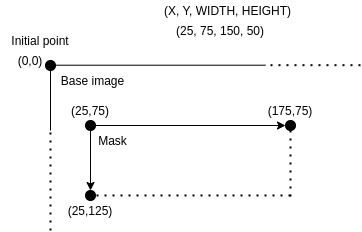
name:"Clean pixel data"version:"1.0"minimumKarnakVersion:"0.9.2"defaultIssuerOfPatientID:profileElements:- name:"Add tag BurnedInAnnotation if does not exist"codename:"action.add.tag"condition:"tagValueContains(#Tag.StationName, 'ICT256') && !tagIsPresent(#Tag.BurnedInAnnotation)"arguments:value:"YES"tags:- "(0028,0301)"- name:"Set BurnedInAnnotation to YES"codename:"expression.on.tags"condition:"tagValueContains(#Tag.StationName, 'ICT256')"arguments:expr:"Replace('YES')"tags:- "(0028,0301)"- name:"Clean pixel data"codename:"clean.pixel.data"- name:"DICOM basic profile"codename:"basic.dicom.profile"masks:- stationName:"*"color:"ffff00"rectangles:- "25 75 150 50"- stationName:"ICT256"color:"00ff00"rectangles:- "25 25 150 50"- "350 15 150 50"
Automatic Pixel Data De-identification
Instead of defining mask rectangles by hand for each station name, Karnak can automatically detect and mask sensitive patient data that are burned into the DICOM pixel data (text overlays such as patient name, accession number, or dates). When this option is enabled, Karnak sends each eligible image to an external de-identification image API that runs OCR, detects sensitive text, and returns the mask areas to apply.
Automatic mask generation is an option of the Clean Pixel Data profile element.
How It Works
A destination uses a de-identification profile that contains a Clean Pixel Data element with automatic mask generation enabled.
For every eligible instance (the SOP Classes eligible for pixel data cleaning, or any image flagged with Burned In Annotation (0028,0301)), Karnak extracts the pixel data and a set of sensitive tag values and sends them to the external API.
The API returns one or more mask areas (rectangles, each with a color). Karnak draws them on the image before forwarding it to the destination.
If the API detects no sensitive data, no mask is applied and the image is forwarded unchanged. If the call fails, the instance is not forwarded (see Fail-closed Behavior).
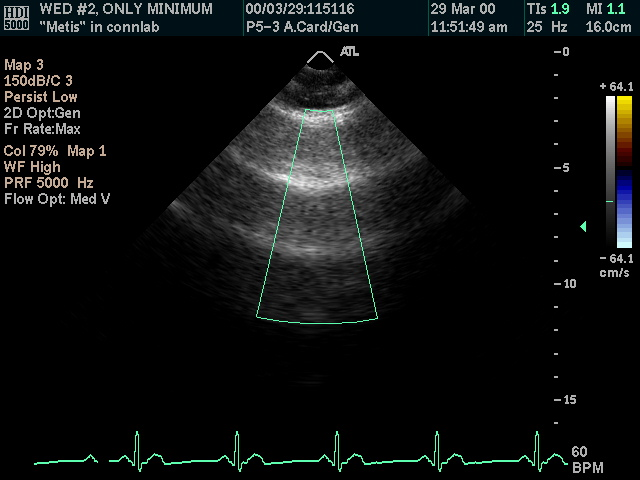
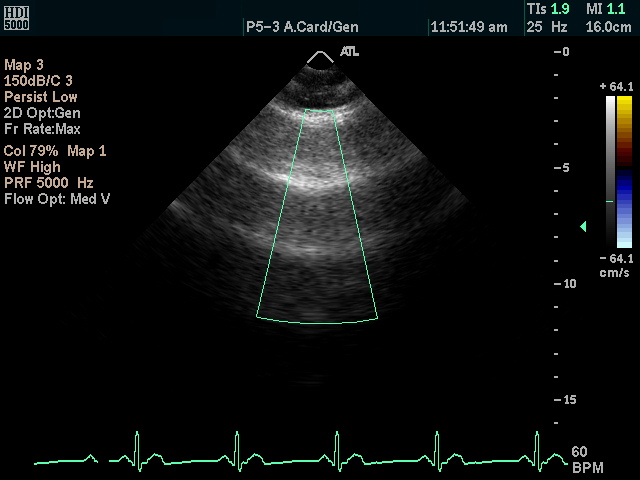
The example below shows an ultrasound frame before and after automatic pixel de-identification: the burned-in patient identifiers are detected and masked while the diagnostic image content is preserved.
Before de-identification
After de-identification
Info
When automatic mask generation is enabled, the statically configured station-name masks are not used. Manual masks (see Masks Definition) only apply when automatic generation is disabled.
Sensitive Tags Sent to the API
The values of the following tags are sent so the API can detect them in the image. No pixel data leaves Karnak beyond the single frame being analyzed.
When automatic mask generation is enabled and the API is unreachable or returns an error, Karnak produces no mask and the instance is not forwarded. This prevents un-masked PHI from leaking to the destination if the service is down.
Warning
A missing or failing de-identification image API stops eligible instances from being forwarded. Check the Karnak logs for the cause (client error, server error, or unreachable service).
Enabling the Option in a Profile
Via the UI
Open the profile editor and add (or edit) a Clean Pixel Data element.
Enable Automatic masks generation.
Make sure the profile also contains the DICOM basic profile element.
Save and assign the profile to the destination’s de-identification project.
Via a YAML Profile
Set the automaticMasksGeneration argument to "true" on the clean.pixel.data element:
Karnak calls the de-identification image API at the URL configured by the OCR_URL environment variable (default http://localhost:8000). It maps to the ocr.url property in application.yml:
The de-identification image API is a separate service. Deploy and run it so that it is reachable from Karnak at OCR_URL.
To deploy it alongside the standard installation:
Deploy the de-identification image API following its deployment guide.
Point Karnak to it by setting OCR_URL to the service base URL.
Restart Karnak so the new configuration is picked up.
Info
For the portable distribution, the de-identification service ships as a separate plugin that is started automatically as a sidecar. See the portable distribution page for the installation steps.
Troubleshooting
Symptom
Likely cause
Action
Images with automatic masking are not forwarded
API unreachable or returning errors
Check the API is running and reachable at OCR_URL; inspect the Karnak logs.
Cannot reach de-identification image API ... in the logs
Wrong URL or service down
Verify OCR_URL and the service health.
Client error ... / Server error ... from de-identification image API in the logs
Malformed request (4xx) or API failure (5xx)
Verify the API version and health; check the request format against deidentification-api.yaml.
The SOP Instance UID in the API response ... does not match ... in the logs
API returned a response for a different instance
Verify the API version and that it echoes back the request sop_instance_uid.
The SOP Instance UID in the API response is null in the logs
API response omitted sop_instance_uid
Verify the API version returns sop_instance_uid in its JSON response.
No mask applied although PHI is visible
The API detected no sensitive text, or the tag values are absent from the metadata
Confirm the sensitive tags are populated in the source metadata.
Conditions in a De-identification Profile
Overview
A condition is an expression evaluated against a DICOM instance that returns a boolean value (true or false). Conditions are used in profiles to determine whether specific actions or transformations should be applied to DICOM elements based on the content of the instance.
To improve readability and reduce errors, the following constants are available:
#Tag - Retrieves DICOM tag identifiers by their standard names
Example: #Tag.PatientBirthDate → 0010,0030
Example: #Tag.StudyDescription → 0008,1030
Example: #Tag.Modality → 0008,0060
#VR - Retrieves DICOM Value Representation types
Example: #VR.LO → Long String
Example: #VR.DA → Date
Example: #VR.PN → Person Name
Using these constants is recommended over hardcoded tag values to make profiles more maintainable and self-documenting.
Available Functions
All utility functions are detailed below with their parameters, return types, and usage examples.
tagValueIsPresent
tagValueIsPresent(int tag, String value) or tagValueIsPresent(String tag, String value)
This function will retrieve the tag value of the DICOM and check if the value parameter is the same as the tag value.
//Check if the study description is equals to "755523-st222-GE"tagValueIsPresent(#Tag.StudyDescription,"755523-st222-GE")tagValueIsPresent("0008,1030","755523-st222-GE")//Check if the study description is not equals to "755523-st222-GE"!tagValueIsPresent(#Tag.StudyDescription,"755523-st222-GE")!tagValueIsPresent("0008,1030","755523-st222-GE")
tagValueContains
tagValueContains(int tag, String value) or tagValueContains(String tag, String value)
This function will retrieve the tag value of the DICOM and check if the value parameter appears in the tag value.
//Check if the study description contains "st222"tagValueContains(#Tag.StudyDescription,"st222")tagValueContains("0008,1030","st222")//Check if the study description does not contain "st222"!tagValueContains(#Tag.StudyDescription,"st222")!tagValueContains("0008,1030","st222")
tagValueBeginsWith
tagValueBeginsWith(int tag, String value) or tagValueBeginsWith(String tag, String value)
This function will retrieve the tag value of the DICOM and check if the tag value begins with the parameter value
//Check if the study description begins with "755523"tagValueBeginsWith(#Tag.StudyDescription,"755523")tagValueBeginsWith("0008,1030","755523")//Check if the study description does not begin with "755523"!tagValueBeginsWith(#Tag.StudyDescription,"755523")!tagValueBeginsWith("0008,1030","755523")
tagValueEndsWith
tagValueEndsWith(int tag, String value) or tagValueEndsWith(String tag, String value)
This function will retrieve the tag value of the DICOM and check if the tag value ends with the parameter value
//Check if the study description ends with "GE"tagValueEndsWith(#Tag.StudyDescription,"GE")tagValueEndsWith("0008,1030","GE")//Check if the study description does not end with "GE"!tagValueEndsWith(#Tag.StudyDescription,"GE")!tagValueEndsWith("0008,1030","GE")
tagIsPresent
tagIsPresent(int tag) or tagIsPresent(String tag)
This function will check if the tag is present in the DICOM instance.
//Check if the tag study description is present in the DICOM filetagIsPresent(#Tag.StudyDescription)tagIsPresent("0008,1030")//Check if the tag study description is not present in the DICOM file!tagIsPresent(#Tag.StudyDescription)!tagIsPresent("0008,1030")
Tags Inside Sequences
A condition is evaluated for each visited attribute, including the attributes nested in the items of a sequence. The tag given to a function is looked up from the dataset being visited outwards: inside a sequence item, the item’s own value is used when the item holds the tag, otherwise the value of the enclosing dataset (up to the top level). A condition on a study-level tag such as Modality therefore holds at every level, while a condition on a tag that only exists inside the items of a sequence is true only while those items are visited.
Combining Conditions
Multiple conditions can be combined using logical operators.
&& corresponds to the AND logical operator
|| corresponds to the OR logical operator
//Check if the tag study description ends with "GE" and if the station name is "CT1234"tagValueEndsWith(#Tag.StudyDescription,"GE")&&tagValueContains(#Tag.StationName,"CT1234")//Check if the tag study description ends with "GE" or if the station name is "CT1234"tagValueEndsWith(#Tag.StudyDescription,"GE")||tagValueContains(#Tag.StationName,"CT1234")
How Karnak De-identifies DICOM Studies
This page provides technical details about how Karnak performs DICOM de-identification, including the algorithms used for UID generation, date shifting, and pseudonymization.
Overview
Karnak is a gateway that receives DICOM files and forwards them to one or multiple destinations using DICOM or DICOMweb protocols. Each destination can be linked to a project that defines the de-identification method and a secret used to generate deterministic values.
Basic Profile
The Basic Profile for de-identifying DICOM objects is provided by the DICOM standard. This profile defines an exhaustive list of DICOM tags and their related actions for proper de-identification.
De-identification Actions
Five different actions are defined in the DICOM standard:
Action
Description
D
Replace with a dummy value
Z
Set to null
X
Remove
K
Keep
U
Replace with a new UID
Multiple Actions for IOD Conformance
The DICOM type is often dependent on the Information Object Definition (IOD) of the instance. To avoid DICOM corruption, multiple actions can be defined for a tag, ensuring that destructive actions like REMOVE won’t be applied on Type 1 or Type 2 attributes.
Combined actions:
Action
Behavior
Z/D
Z unless D is required to maintain IOD conformance (Type 2 versus Type 1)
X/Z
X unless Z is required to maintain IOD conformance (Type 3 versus Type 2)
X/D
X unless D is required to maintain IOD conformance (Type 3 versus Type 1)
X/Z/D
X unless Z or D is required to maintain IOD conformance (Type 3 versus Type 2 versus Type 1)
X/Z/U*
X unless Z or replacement of contained instance UIDs (U) is required to maintain IOD conformance. (Type 3 versus Type 2 versus Type 1 sequences containing UID references)
Action Selection:
Karnak loads the SOPs and attributes as specified in the DICOM Standard. Based on the tag’s type in the current instance, the proper action is set and applied.
Info
If the tag cannot be identified in the SOP or its type cannot be inferred, the strictest action will be applied (U/D > Z > X).
Examples of action resolution:
Z/D, X/D, X/Z/D → apply action D
X/Z → apply action Z
X/Z/U, X/Z/U* → apply action U
Action D: Replace with Dummy Value
The action D replaces the tag value with a dummy one that is consistent with the Value Representation (VR) of the tag.
Default Values by VR
Karnak uses these default values based on the VR when no specific dummy value is defined:
For date and time VRs (AS, DA, DT, TM), the shiftRange() function generates a random value within configurable limits:
Default maximum days: 365
Default maximum seconds: 86400
Action U: Generate a New UID
For each U action, Karnak hashes the input value using a one-way function to ensure it’s not possible to revert to the original UID. The function hashes the input UID and generates a new deterministic UID from the result.
Context and Project Secrets
A DICOM study may be de-identified multiple times using different methods. Karnak ensures deterministic UID generation to maintain data quality and usability.
Requirements:
A project must be created and associated with the destination
The project defines a de-identification method and a secret
The project’s secret is used as the key for the HMAC algorithm
Project Secret Format
Info
The secret is 16 bytes long (32 hexadecimal characters) and randomly generated when the project is created.
Users can provide their own secret, but it must be exactly 16 bytes, written as 32 hexadecimal characters.
Hash Function
The algorithm used is “Message Authentication Code” (MAC). Karnak uses MAC as a one-way function rather than for message authentication.
A MAC provides a way to check the integrity of information transmitted over or stored in an unreliable medium, based on a secret key. Typically, message authentication codes are used between two parties that share a secret key in order to validate information transmitted between these parties.
A MAC mechanism that is based on cryptographic hash functions is referred to as HMAC. HMAC can be used with any cryptographic hash function, e.g., SHA256 or SHA384, in combination with a secret shared key. HMAC is specified in RFC 2104.
Karnak’s HMAC Configuration:
Hash function: SHA256
Secret key: Project’s secret (16 bytes)
UID Generation Process
Karnak generates a new DICOM UID that starts with the OID root "2.25" followed by a decimal representation of a UUID derived from the HMAC hash.
The value after “2.25.” is the straight decimal encoding of the UUID as an integer. It must be a direct decimal encoding of the single integer, all 128 bits. See How do you create an OID?
UUID Generation Algorithm
The generated UUID uses the first 16 bytes (128 bits) from the hash value as a UUID type 4 with variant 1.
Pseudocode to ensure correct UUID type and variant:
Karnak implements randomized date shifting that is consistent per patient and project, ensuring data consistency across all instances for the same patient.
Algorithm
The random shift uses the HMAC function (defined above) with a configurable range of days or seconds.
Default values:
Minimum: 0 (if not specified)
Maximum: User-defined
Process:
The Patient ID is hashed using the project’s secret
The hash is converted to a numeric value within the specified range
The same shift is applied to all date fields for that patient
The Patient ID combined with the project’s secret ensures that date shifts are deterministic per patient while remaining unpredictable across different patients.
Pseudonymization
This section explains how Karnak handles Patient ID generation to prevent data leakage across different de-identification methods.
The Problem
A patient participating in multiple research projects may encounter different de-identification methods. Most patient identifying information is contained in the Patient Module.
Risk scenario:
If the same pseudonym is used across projects with different de-identification profiles, data can be leaked when studies are reconciled.
Example: Data Leakage Risk
In this example, a patient’s study falls within the scope of two different projects:
Project 1: Removes the patient birthdate
Project 2: Keeps the patient birthdate
If the patient pseudonym is used as patient identification and the data is reconciled, the birthdate will be leaked.
flowchart TB
patient["Patient's original<br>DICOM study<br><i>(contains birthdate)</i>"]
gateway["Karnak<br>Gateway"]:::karnak
table[("Pseudonym<br>mapping table<br>patient ↔ pseudonym")]
p1["<b>Project 1</b><br>Profile:<br><b>remove</b> birthdate"]
p2["<b>Project 2</b><br>Profile:<br><b>keep</b> birthdate"]
s1["De-identified study<br>birthdate <b>removed</b>"]
s2["De-identified study<br>birthdate <b>kept</b>"]
pm["<b>Patient Module</b><br>the <b>same pseudonym</b> identifies the<br>patient in both studies → the kept<br>birthdate leaks when they are reconciled"]:::leak
patient -->|"(1) DICOM send"| gateway
gateway <-->|"(2) Look up the<br>patient's pseudonym"| table
gateway -->|"(3) Route to Project 1"| p1
gateway -->|"(5) Route to Project 2"| p2
p1 -->|"(4) Apply Profile 1"| s1
p2 -->|"(6) Apply Profile 2"| s2
s1 -->|"Identification"| pm
s2 -->|"Identification"| pm
classDef karnak fill:#f9a825,stroke:#e08e00,color:#000;
classDef leak fill:#ffe0e0,stroke:#e03e3e,color:#000;
Because both studies are identified by the same pseudonym, reconciling them re-associates the kept birthdate (Project 2) with the patient whose birthdate Project 1 removed.
The Solution: Project-Specific Patient IDs
Karnak generates a unique Patient ID based on the pseudonym and project-specific characteristics. This prevents reconciliation across projects and eliminates data leakage.
flowchart TB
patient["Patient's original<br>DICOM study<br><i>(contains birthdate)</i>"]
gateway["Karnak<br>Gateway"]:::karnak
table[("Pseudonym<br>mapping table<br>patient ↔ pseudonym")]
p1["<b>Project 1</b><br>Profile:<br><b>remove</b> birthdate"]
p2["<b>Project 2</b><br>Profile:<br><b>keep</b> birthdate"]
id1["Patient ID<br>specific to Project 1"]:::idbox
id2["Patient ID<br>specific to Project 2"]:::idbox
s1["De-identified study<br>birthdate <b>removed</b>"]
s2["De-identified study<br>birthdate <b>kept</b>"]
pm1["<b>Patient Module</b><br>Patient ID unique to Project 1<br>→ cannot be reconciled"]:::safe
pm2["<b>Patient Module</b><br>Patient ID unique to Project 2<br>→ cannot be reconciled"]:::safe
patient -->|"(1) DICOM send"| gateway
gateway <-->|"(2) Look up the<br>patient's pseudonym"| table
gateway -->|"(3) Route to Project 1"| p1
gateway -->|"(6) Route to Project 2"| p2
p1 -->|"(4) Derive a project-<br>specific Patient ID"| id1
p2 -->|"(7) Derive a project-<br>specific Patient ID"| id2
id1 -->|"(5) Apply Profile 1"| s1
id2 -->|"(8) Apply Profile 2"| s2
s1 -->|"Identification"| pm1
s2 -->|"Identification"| pm2
classDef karnak fill:#f9a825,stroke:#e08e00,color:#000;
classDef safe fill:#e0f5e0,stroke:#2ab218,color:#000;
classDef idbox fill:#eef3ff,stroke:#5b7cc2,color:#000;
Each project derives its own Patient ID from the pseudonym and the project’s secret, so the two studies can no longer be reconciled — the kept birthdate stays isolated to Project 2.
PatientID Generation
The de-identified Patient ID is generated as follows:
The patient’s pseudonym is retrieved from an external service or mapping table
The pseudonym is hashed using the HMAC function and the project’s secret
The Patient ID is set to the first 16 bytes of the hashed pseudonym (in hexadecimal format)
Info
This makes the Patient ID unique and deterministic within the context of the project, preventing cross-project reconciliation.
Patient Name:
Once the profile has been applied, the Patient’s Name is always set to the pseudonym.
Attributes Added by Karnak
Karnak automatically sets certain attributes during de-identification to maintain compliance and traceability.
One item per DICOM de-identification option applied
See codes below
De-identification Method Code Sequence
Each item holds a code from the DCM coding scheme. Only the profile elements matching a DICOM de-identification option add an item (each code appears once):
Code Value
Code Meaning
Profile element codename
113100
Basic Application Confidentiality Profile
basic.dicom.profile
113101
Clean Pixel Data Option
clean.pixel.data
113102
Clean Recognizable Visual Features Option
clean.recognizable.visual.features
113107
Retain Longitudinal Temporal Information Modified Dates Option